<!DOCTYPE html>
<html lang="en">
<head>
    <meta charset="UTF-8">
    <meta name="viewport" content="width=device-width, initial-scale=1.0">直角三角形 · 90° & 60°</title>
    <style>
        * {
            margin: 0;
            padding: 0;
            box-sizing: border-box;
        }
        body {
            background: #f5f7fa;
            display: flex;
            justify-content: center;
            align-items: center;
            min-height: 100vh;
            font-family: 'Segoe UI', Roboto, system-ui, sans-serif;
        }
        .card {
            background: #ffffff;
            padding: 1.8rem 2rem 2rem 2rem;
            border-radius: 2rem;
            box-shadow: 0 20px 35px -8px rgba(0, 0, 0, 0.15);
            text-align: center;
        }
        h2 {
            font-weight: 500;
            color: #1e2b3c;
            letter-spacing: 0.5px;
            margin-bottom: 0.75rem;
            font-size: 1.5rem;
        }
        .sub {
            font-size: 0.9rem;
            color: #4b5e71;
            margin-bottom: 1.3rem;
            font-weight: 400;
        }
        svg {
            display: block;
            margin: 0 auto;
            border-radius: 18px;
            background: #fcfdff;
            box-shadow: inset 0 2px 8px rgba(0,0,0,0.02), 0 8px 24px -6px rgba(0, 20, 40, 0.12);
        }
        .note {
            margin-top: 1.2rem;
            font-size: 0.85rem;
            color: #3e5568;
            background: #ebf2fa;
            padding: 0.45rem 1rem;
            display: inline-block;
            border-radius: 50px;
            font-weight: 450;
        }
    </style>
</head>
<body>
    <div class="card">
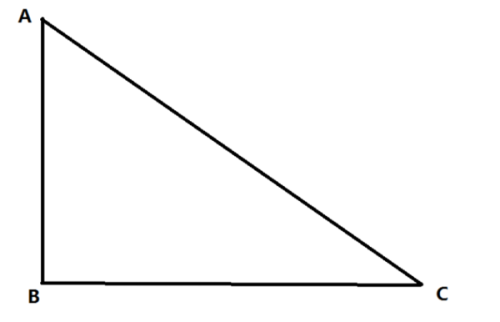
        <h2>直角三角形</h2>
        <div class="sub">一个角 90° · 另一个角 60°</div>
        <!--
            SVG 画布 600x400
            三角形顶点设计:
            - 直角位于左下角 (A),角度 90°
            - 30° 角位于右下角 (B)  → 因为 180-90-60=30
            - 60° 角位于顶部 (C)
            坐标:
              A (100, 320)   ← 直角点 (90°)
              B (500, 320)   ← 30° 角 (右下)
              C (100, 40)    ← 60° 角 (顶部)
            验证:
              AB 水平向右,长 400px
              AC 垂直向上,长 280px
              角度: tan(60°) = AC/AB = 280/400 = 0.7 → 60°? 不对!tan60 ≈ 1.732, 需要 AC/AB=√3≈1.732 → AC≈692?? 我重新计算。
            ⚠️ 重新设计尺寸,确保角度准确:
            取 AB = 400 (直角邻边,水平)
            因为 60° 角在 C 点? 等一下:
            已知直角在 A (夹角 90°),∠C 为 60°,∠B = 30°
            ∠C = 60° → 对边 AB / 邻边 AC ? 用三角函数:
            tan(∠C) = 对边/邻边 = AB / AC?
            必须明确: 三角形 ABC, 直角在 A: ∠A = 90°。
            ∠C = 60° → 对边 AB 是 ∠C 的对边,邻边 AC 是 ∠C 的邻边?
            标准: 在直角三角形中,对于角 C: 对边 = AB,邻边 = AC(因为角C在顶点C,边AC和BC夹∠C,所以邻边是AC,对边是AB)
            tan(60°) = AB / AC  → √3 = AB / AC  → AC = AB / √3
            若取 AB = 400, 则 AC = 400 / 1.732 ≈ 230.94,取整 231。
            这样 AC ≈ 231, AB=400, 则 tan(C) = AB/AC ≈ 400/231 ≈ 1.7316 ≈ √3 ✓
            ∠B = 30°, 边长 BC = sqrt(400² + 231²) ≈ 461.7。
            为了视觉协调, 使用比例: AB = 400, AC ≈ 231 (垂直边)
            坐标:
              A = (100, 320)  直角点 (90°)
              B = (500, 320)  30° 角 (右下)   ← AB = 400 水平
              C = (100, 89)   60° 角 (顶部)   ← AC ≈ 231 垂直 (320-231=89)
            检查: ∠A = 90° (AB水平, AC垂直) ✓
                 ∠C (C点): tan = AB/AC = 400/231 ≈ 1.732 → 60° ✓
                 ∠B = 30° ✓
        -->
        <svg width="600" height="400" viewBox="0 0 600 400" xmlns="http://www.w3.org/2000/svg">
            <!-- 背景网格 (浅) 帮助感知比例 -->
            <defs>
                <pattern id="grid" width="40" height="40" patternUnits="userSpaceOnUse">
                    <path d="M 40 0 L 0 0 0 40" fill="none" stroke="#dde5ed" stroke-width="0.8" opacity="0.6"/>
                </pattern>
            </defs>
            <rect width="600" height="400" fill="url(#grid)" />
            <!-- 三角形填充 (半透明) -->
            <polygon points="100,320 500,320 100,89" fill="#c7ddf5" fill-opacity="0.45" stroke="none" />
            <!-- 三角形边框 (深蓝色) -->
            <polygon points="100,320 500,320 100,89" fill="none" stroke="#1e4c7a" stroke-width="3.5" stroke-linejoin="round" />
            <!-- 直角标记 (小正方形) 位于 A (100,320) 处 -->
            <rect x="100" y="300" width="20" height="20" fill="white" stroke="#1e4c7a" stroke-width="2" />
            <!-- 内部加一条线使其更像直角符号 (可选) -->
            <line x1="120" y1="300" x2="120" y2="320" stroke="#1e4c7a" stroke-width="1.8" />
            <line x1="100" y1="300" x2="120" y2="300" stroke="#1e4c7a" stroke-width="1.8" />
            <!-- 60° 角弧线标记 (在顶点 C 处) -->
            <path d="M 100 109 A 20 20 0 0 1 118 96" fill="none" stroke="#b13e3e" stroke-width="2.2" />
            <!-- 写 60° 文本 -->
            <text x="128" y="105" font-size="20" font-weight="600" fill="#b13e3e" font-family="'Segoe UI', sans-serif">60°</text>
            <!-- 直角文本标记 90° 可选 (放在直角附近) 加个清爽的标记 -->
            <text x="70" y="290" font-size="18" fill="#1e4c7a" font-weight="500" font-family="'Segoe UI', sans-serif">90°</text>
            <!-- 30° 角标记 (在顶点 B 处) 显示一下更完整 -->
            <path d="M 480 320 A 20 20 0 0 0 487 305" fill="none" stroke="#2b6f5c" stroke-width="2" />
            <text x="452" y="303" font-size="18" font-weight="500" fill="#2b6f5c" font-family="'Segoe UI', sans-serif">30°</text>
            <!-- 顶点标签 A, B, C (恰当位置) -->
            <text x="78" y="345" font-size="20" font-weight="600" fill="#1f2e3f" font-family="'Segoe UI', sans-serif">A</text>
            <text x="508" y="345" font-size="20" font-weight="600" fill="#1f2e3f" font-family="'Segoe UI', sans-serif">B</text>
            <text x="76" y="72" font-size="20" font-weight="600" fill="#1f2e3f" font-family="'Segoe UI', sans-serif">C</text>
            <!-- 边长标记: AB = 400, AC ≈ 231 (为了清晰只标注部分) 或者不标注边长以免干扰 -->
            <!-- 但我们可以标注一下斜边长度或是显示比例? 不用, 简洁为主。-->
            <!-- 添加小的辅助线说明直角边? 保持干净。 -->
            <!-- 在直角顶点附近加个柔和的圆点强调 -->
            <circle cx="100" cy="320" r="4.5" fill="#1e4c7a" />
            <circle cx="500" cy="320" r="4.5" fill="#1e4c7a" />
            <circle cx="100" cy="89" r="4.5" fill="#1e4c7a" />
        </svg>
        <div class="note">
            ∠A = 90° · ∠C = 60° · ∠B = 30°
        </div>
    </div>
</body>
</html>
三角形绘制与角度解析
为了让您快速理解这个三角形的构成,下面解释一下它的关键设计。
- 角度的精确实现:代码通过计算三角函数正切值(tan(60°) ≈ 1.732)来确定边长比例,水平直角边AB长度为400像素,垂直直角边AC长度约为231像素,从而确保∠C为60°。
- 清晰的视觉标注:SVG中为直角(90°)绘制了方形标记,为60°和30°角绘制了弧形标记,并用不同颜色和文字进行了标注,方便识别。
- 辅助元素:背景的浅色网格有助于感知比例,三角形的顶点A、B、C也进行了标注,使结构一目了然。
 微信扫一扫打赏